Applying for a remote job in Canada follows the same basics as any application, with a few twists: your written application is your first work sample, the interviews happen on video, and employers look for evidence that you work well on your own. This guide walks through the hiring steps, the Canadian resume format, cover letters, video interviews and skills tests.
The steps of a remote hiring process
Most remote employers in Canada use a similar sequence. Knowing it helps you prepare for each stage – and spot when something is out of order, such as a request for your SIN before you have an offer.
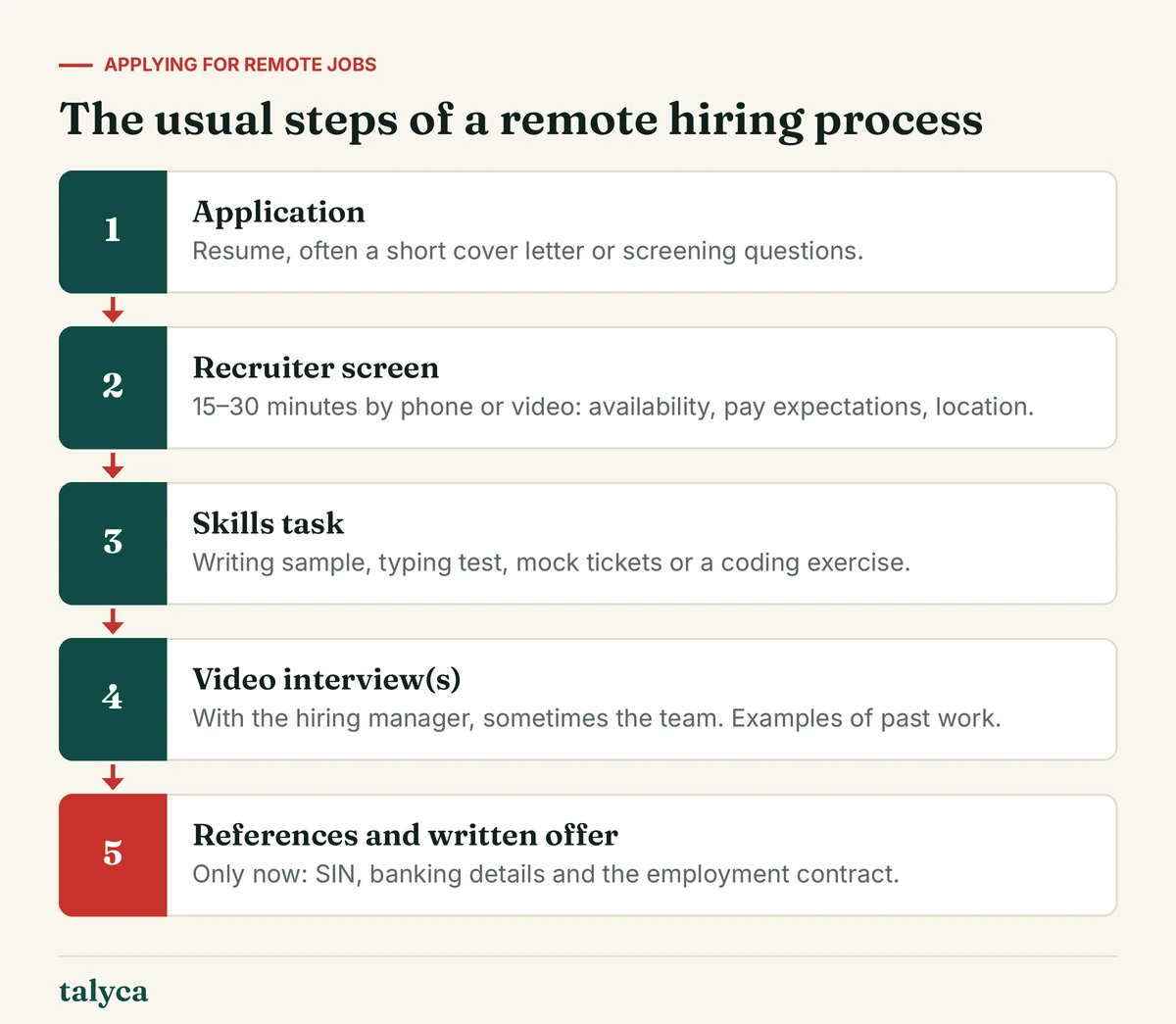
Timelines vary from a few days for high-volume support roles to several weeks for specialised positions. If you haven’t heard back a week after the date you were given, a short, polite follow-up by email is appropriate.
The Canadian resume
A Canadian resume is short, factual and focused on results. One page is enough for early career applicants; two pages are fine with more experience. Canadian human rights law restricts what employers may ask about in hiring, so personal details that are standard in some countries are left out.
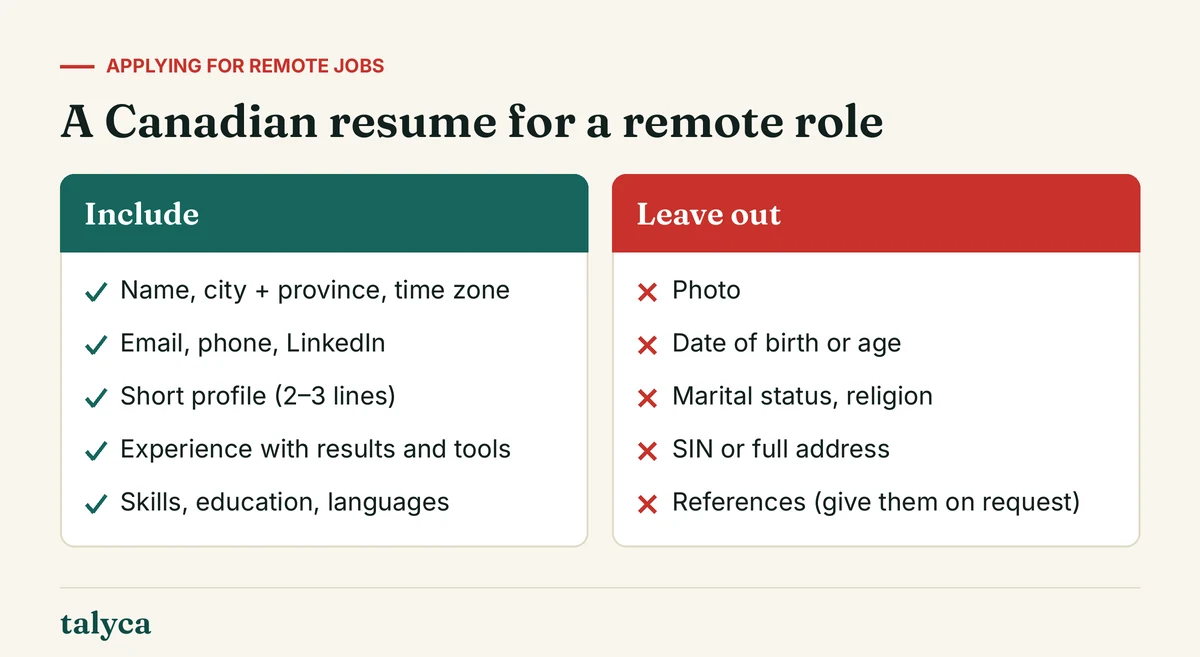
Make it work for a remote role
- Location and time zone in the header, e.g. “Halifax, NS (Atlantic Time)”. Employers need to know whether they can hire you and when you are online.
- Remote tools you have used: Slack or Teams, Zoom, Google Workspace or Microsoft 365, ticket or project tools.
- Evidence of independence: projects you ran, processes you created, results achieved without close supervision.
- Numbers where they are true: tickets per day, satisfaction scores, time saved, volume handled.
- Keywords from the ad, used honestly. Many employers screen with applicant tracking systems that look for the skills named in the posting.
Tip: Save your resume as a PDF with a clear file name – “FirstName-LastName-Resume.pdf” – unless the ad asks for Word. Avoid tables, text boxes and two-column templates, which some tracking systems read in the wrong order.
Cover letters and screening questions
Not every ad asks for a cover letter, but for remote roles a short one is often worth it: it’s a writing sample. Keep it to three short paragraphs:
- Why this role: name the position and one specific thing about the company or product that interests you.
- Why you: two or three pieces of evidence that match the ad’s main requirements.
- Practicalities: where you are, your time zone and availability, and a link to samples if relevant.
An example opening for a support role: “I’m applying for the Customer Support Specialist position. In three years at a busy electronics store I handled returns, warranty questions and complaints every day, and I’d like to bring that experience to your chat support team.” Adapt it – generic letters are easy to recognise.
Screening questions in the application form deserve the same care. Answer exactly what is asked, keep it concise, and proofread. For support and writing roles, these answers are often the first skills test.
Video interviews
Most remote interviews happen on Zoom, Microsoft Teams or Google Meet. Some employers use one-way recorded interviews, where you answer questions on camera without an interviewer present.
Technical preparation
- Test the platform link, camera and microphone the day before.
- Use a wired connection or sit close to the router; close other programs.
- Put the camera at eye level and a light source in front of you, not behind.
- Choose a quiet spot with a neutral background; have a phone number ready in case the connection drops.
Questions to prepare for
Beyond the usual questions about your experience, remote interviews focus on how you work without an office around you:
- How do you organise your day when working from home?
- Tell us about a time you had to solve a problem without being able to ask someone right away.
- How do you keep your team informed about your progress?
- What does your home workspace look like?
- Tell us about a misunderstanding in written communication and how you resolved it.
Answer with concrete examples: the situation, what you did, and the result. Prepare two or three questions of your own – about onboarding, how the team communicates, and how performance is measured in the first months.
Skills tests and assignments
Remote employers often use a practical test because they can’t watch you work. Common formats:
| Role | Typical test | How to prepare |
|---|---|---|
| Customer support | Typing test, written replies to sample tickets, simulated chat | Practise typing accuracy; reply in a friendly, structured way |
| Admin and data | Spreadsheet task, data cleanup, attention-to-detail test | Refresh sorting, filters, lookups and basic formulas |
| Writing and marketing | Short article, edit of a text, campaign idea | Follow the brief exactly, keep to the word count |
| Development and IT | Take-home project, live coding, troubleshooting scenario | See remote tech jobs |
A reasonable test takes an hour or two, or up to a few hours for senior roles. Tasks that look like real client work, take days, or come with a request to buy software from a particular supplier deserve scepticism.
Offer, references and your personal data
A legitimate offer arrives in writing and names the employer, role, pay, hours, start date and the employment type. Only after you accept will the employer need your Social Insurance Number, banking details for direct deposit and identity documents for payroll. Some roles also require a criminal record check, which you usually complete through an official provider.
Stop if someone asks for your SIN, a photo of your ID or banking details before any real interview, or wants you to pay for anything. These are signs of identity theft or fraud – see remote job scams in Canada.
Before you sign, check the points listed in remote jobs in Canada – employment type, hours, equipment and which employment standards apply. Then browse the current remote jobs open to Canada.
Go deeper on this topic:
- Cover Letter for a Remote Job: Structure and Example – A short cover letter structure for remote roles in Canada, a full example for a support job and the mistakes that get letters skipped.
- Video Interview Tips: Setup, Body Language and One-Way Interviews – How to set up camera, light and sound, how to come across well on video, and how recorded one-way interviews work.
Common questions about applying for remote jobs
Should I include a photo on my Canadian resume?
No. Canadian resumes don’t include a photo, date of birth, marital status or other personal details that could lead to discrimination. Your name, city and province, and contact details are enough.
How long should my resume be?
One page if you have fewer than about five years of relevant experience, two pages at most for most roles. Recruiters skim quickly, so put the most relevant experience first.
Is a cover letter necessary for remote jobs?
Only when the ad asks for one, but for remote roles a short, specific letter is a useful writing sample and often helps. Three short paragraphs are enough.
What should I wear to a video interview?
What you would wear to an in-person interview at that company – usually business casual. Solid colours work better on camera than fine patterns.
When will an employer ask for my SIN?
After you have accepted a written job offer, for payroll. A request for your SIN before an interview or offer is a strong warning sign.