
Fake recruiters copy real company names, logos and even employee profiles, so a convincing message proves little. Before you send your resume, ID or any personal details, a few independent checks take ten minutes and filter out most fraud. This article walks through them in order.
Why checking matters
Impersonation is the backbone of most job scams. A message from “the talent team” of a well-known brand, a polished PDF offer and a friendly LinkedIn profile can all be fake. The point of the checks below is to confirm the recruiter through channels the scammer doesn’t control. For the full picture of how job scams work, see remote job scams in Canada.
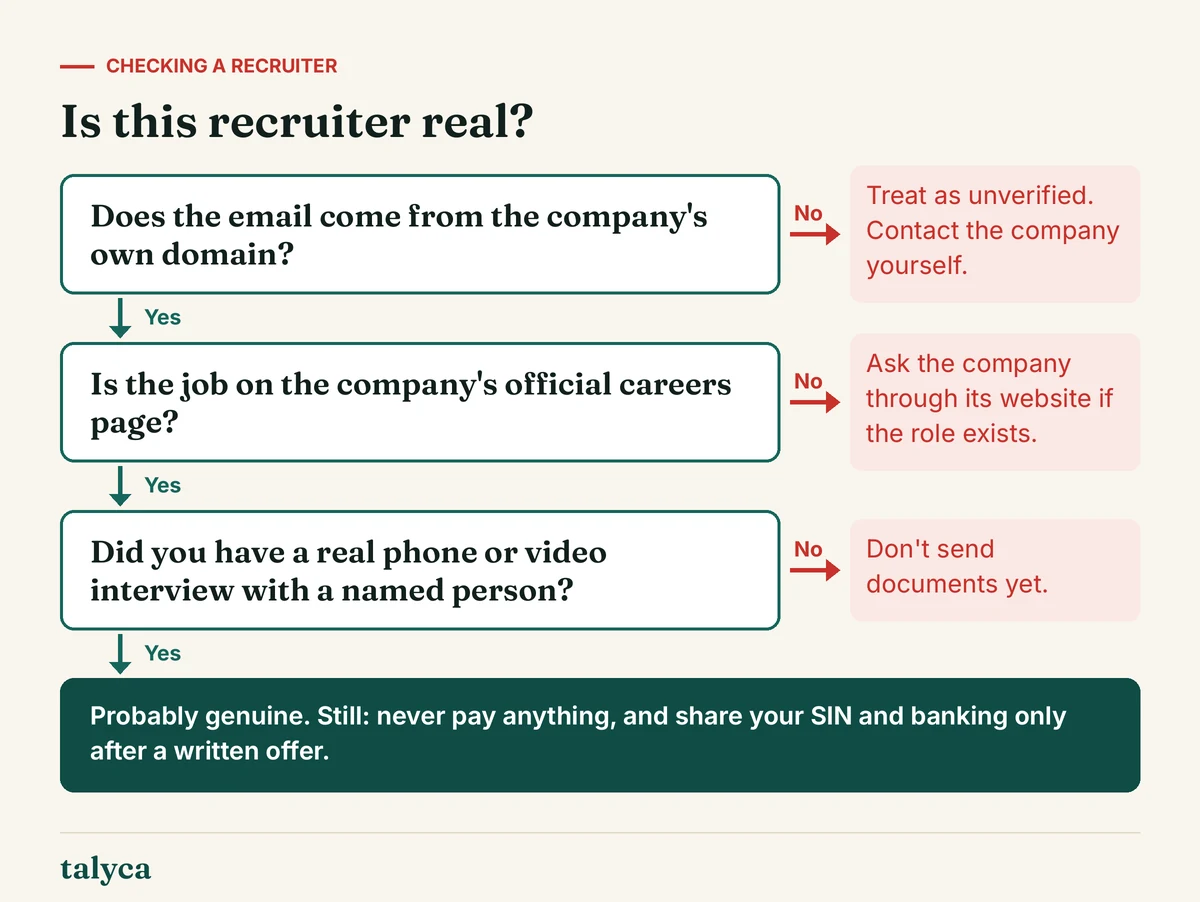
Step 1: check the email address and domain
- Free email accounts (Gmail, Outlook, Yahoo) for a company recruiter are a warning sign. Agencies and small businesses sometimes use them, but large employers don’t.
- Look-alike domains: an extra letter, a hyphen, “-careers” or “-jobs” added, or a different ending (.co instead of .com).
- Find the official domain yourself by searching for the company, not by clicking links in the message, and compare.
- Reply-to tricks: the display name may say one thing and the address another. Check the actual address.
Step 2: find the job on the company’s own site
Go to the company’s official website, open its careers page and look for the role. Many legitimate jobs are also posted on job boards, but they almost always exist on the employer’s own site or applicant system too. If the role isn’t there, it isn’t automatically fake – some recruiters handle confidential searches – but it’s a reason to ask the company directly.
Step 3: confirm through an independent channel
Use the contact details on the official website – not those in the message – and ask whether the person works there and whether the role exists. A short note is enough: “I’ve been contacted by [name] about a [role] position. Can you confirm this is a genuine recruitment process?” Recruitment agencies can be checked the same way: look them up, call their listed office number, and ask the employer if they work with that agency.
LinkedIn helps, but isn’t proof. A real recruiter usually has a history, connections at the company and posts over time. Brand-new profiles with few connections and stock-looking photos are a warning sign – but convincing fake profiles exist too.
Step 4: insist on a real interview
Genuine hiring includes a conversation – phone or video – with a named person, often several. If the entire process happens by text chat and ends in an offer, stop. Scammers avoid live video because it exposes them. How a normal process runs is described in applying for remote jobs in Canada.
What not to share before a written offer
| Information | When it’s normal to share |
|---|---|
| Resume, email, phone | When you apply |
| References | Late in the process, when asked |
| SIN, date of birth | After accepting a written offer, for payroll |
| Bank details | After accepting, for direct deposit |
| ID copies | After accepting, through the employer’s official system |
| Payment of any kind | Never |
If it turns out to be fake
Stop replying, don’t click further links, and report the profile or message to the platform where it reached you. Tell the real company – they often want to know about impersonation. Report the attempt to the Canadian Anti-Fraud Centre, especially if you shared personal information, and follow the steps in our scam guide. If the message offered paid “tasks”, read how task scams work.
Common questions
Do real recruiters contact people through LinkedIn?
Yes, often. The message itself isn’t a warning sign; what matters is whether the recruiter and job can be confirmed through the company’s official channels.
Is it normal for a recruiter to text me?
Some recruiters text to arrange a call. It becomes a warning sign when the whole process stays in a messaging app, or when they ask for money or personal documents.
What if the recruiter works for an agency?
Check the agency’s website and contact details, and ask which employer the role is with. You can confirm with the employer that they use that agency.
More on this topic: our guide Remote Job Scams in Canada: 12 Warning Signs and What to Do puts this article in context.